
Tennessee Sports Betting Handle Holds Near $443 Million in May 2026
The May report shows stable betting volume as Tennessee continues using its handle-based tax model.

Tennessee’s sports betting market stayed steady in May 2026, with bettors wagering more than $443 million across the state’s online-only sportsbook market.
The Tennessee Sports Wagering Council reported $443,038,330 in May wagers, up slightly from the same month last year. Operator adjusted gross revenue reached $40,981,045, with the market posting a 9.25% hold.
The numbers show a mature sports betting market that is no longer growing at the explosive pace seen in earlier years, but continues to produce strong monthly volume. Tennessee remains one of the most important online-only sports betting states because it has no retail sportsbooks, no casinos, and no physical betting counters.
Every dollar wagered in Tennessee comes through mobile or online sportsbooks.
Tennessee Reports $443 Million in May Sports Bets
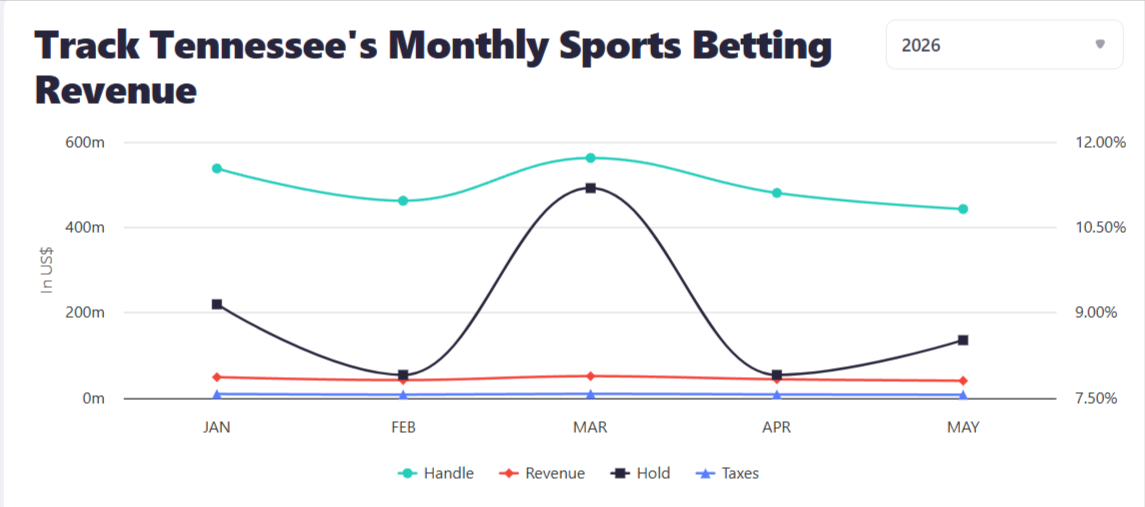
Tennessee sportsbooks handled $443 million in wagers in May 2026. That was only a small year-over-year increase, but it kept the state close to the $440 million level it reached in May 2025.
Revenue also moved slightly higher. Operators reported just under $41 million in adjusted gross revenue, compared with about $40.4 million in May 2025.
The hold rate came in at 9.25%, which was close to the previous year’s 9.16% figure. That means sportsbooks kept a similar share of wagers even though overall handle growth was nearly flat.
This kind of performance suggests Tennessee’s market is stabilizing. The state is not seeing huge year-over-year jumps every month, but it continues to produce consistent betting activity outside the football season.
Why This Matters
Tennessee matters because its sports betting model is different from every other U.S. state.
Most states tax sportsbook revenue. Tennessee taxes handle. That means the state collects a percentage of the total amount wagered, not a percentage of what sportsbooks win after paying out bettors.
Since July 2023, Tennessee has used a 1.85% handle tax. Based on May’s $443 million handle, the state’s privilege tax comes to roughly $8.1 million.
That gives Tennessee a more predictable tax line. If sportsbook revenue moves up or down because of hold, promotions, or bettor-friendly results, the state still collects based on betting volume. The operators carry more of the monthly revenue risk, while the state’s tax collection depends mainly on how much users wager.
For lawmakers and regulators, that structure is important because it creates steady tax expectations. For operators, it means volume matters heavily, even in months when margins are tighter.
Growing Pressure Around Online Sports Betting

Tennessee’s May report also comes as online sports betting faces more attention from regulators and lawmakers.
The state’s online-only model makes it a useful case study for how mobile wagering performs without retail sportsbooks or casino-backed betting locations. Strong monthly volume shows that bettors do not need physical sportsbooks to keep a market active.
That is relevant as other sports-related platforms compete for user attention. Social sportsbooks,and other event-based products are also trying to capture sports-driven demand, especially around major events such as the 2026 World Cup.
Tennessee’s regulated sportsbook market remains separate from those alternative models, but the comparison matters. As sports betting activity continues to move online, regulators may pay closer attention to how users understand the difference between licensed sportsbook apps, social sportsbook-style play, and other sports-adjacent platforms.
What Happens Next
Tennessee enters the summer with a stable sports betting market.
May is usually a quieter period compared with football season, but the state still produced more than $443 million in wagers. The bigger test will come later in the year, when NFL and college football betting return and monthly handle usually climbs.
For now, Tennessee’s May report shows a market that is holding steady rather than accelerating. Handle is nearly flat year over year, revenue is slightly higher, and the state’s handle-based tax structure continues to keep collections tied directly to wagering volume.
Reference
Stakester Newsletter
Be the first to find out when a sweepstakes casino launches and receive exclusive offers directly in your mailbox.
About the author
Angelica
Angelica writes about iGaming and sports trend topics, sweepstakes regulation, market shifts, and player-focused developments across the online gaming world. Her work blends clear reporting with approachable context, making complex updates easier to understand.